 Supplement Streak
Free on the App Store
Supplement tracker for iPhone that turns your routine into a streak
Add your stack, get reminders you can answer without unlocking your phone, and watch one square per day fill in for every day you took everything you planned.

Free to download. iPhone, iOS 17.0 or later. No account.
- No account, ever
- Works offline
- Nothing leaves your phone
- Version 1.2.0
How it works
Four screens, one job: make today easy to finish
The app has five tabs (Today, Streak, Stack, History, Settings). These are the four you will actually live in.
What it does
Six things the app is built around
A square for every day
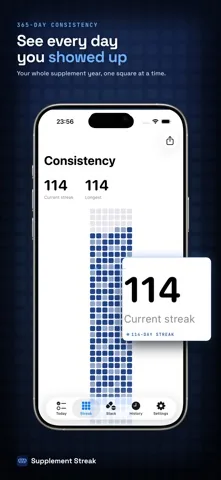
The heatmap holds one square per day and fills it in proportion to how much of that day you finished. A whole year of behaviour fits on one screen, which is the point: consistency is invisible until you can see it.
Reminders you answer in place
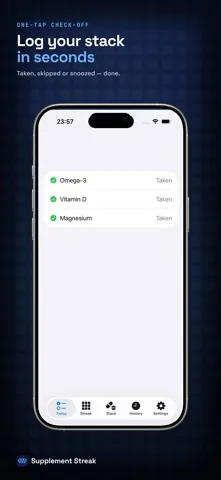
Each supplement gets as many daily times as you need, and every reminder arrives with three buttons: Taken, Skip, and Snooze 15 min. You log the dose from the notification, so the reminder does not become a task for later.
Current and longest streak
A day joins your streak when you took every intake you planned for it. Today is treated gently: an unfinished today does not break the chain, it just has not been added yet.
Stock that warns you before it runs out
Give a supplement a count and a low-stock threshold. Every logged intake decrements the count, and crossing the threshold triggers a refill reminder, because running out is the most common way a streak dies.
Widget and share card
The Streak widget sits on the Home Screen in its small size and on the Lock Screen as a rectangular complication. The share card renders your current streak with the recent grid underneath it.
Timing tips where you enter a name
Type iron, magnesium, vitamin D, calcium, zinc or omega and the app surfaces a short note about food, time of day, or spacing things apart. These are general notes, not medical advice.
Free on the App Store. Pro is optional.
Free and Pro
What you get without paying, and what Pro adds
Free
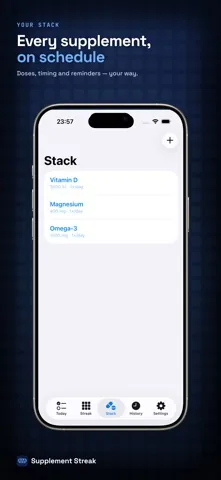
- Up to three supplements, each with dose, unit, form and any number of daily times
- Local reminders with Taken, Skip and Snooze 15 min
- Current and longest streaks
- The last 30 days of the heatmap
- Stock tracking with low-stock refill reminders
- Home Screen and Lock Screen widget, and the shareable streak card
- Shows ads
Pro, 4.99 USD per month or 29.99 USD per year
- Unlimited supplements instead of three
- The full 365-day heatmap instead of the last 30 days
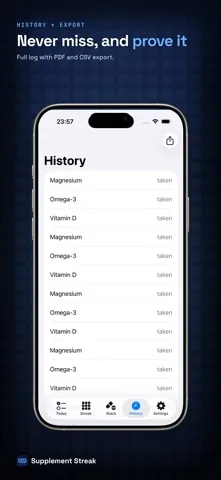
- Export your log to PDF and CSV
- No ads
Prices in other currencies may differ. Payment is charged to your Apple Account at purchase confirmation. Subscriptions renew automatically unless auto-renew is switched off at least 24 hours before the current period ends, and you can cancel any time in your Apple Account settings.

Download free and decide later.
Who it fits
Three routines this was built for
The three-item morning
Vitamin D, omega-3, magnesium. Nothing complicated, which is exactly why it slips: there is no consequence for skipping and no record that you did. Three supplements fit inside the free version, so the whole routine costs nothing to track.
The stack that outgrew memory
Eight or ten items across morning, midday and night, some with food, some not. Once the plan lives in the app instead of your head, the daily question shrinks from what do I take to did I take it.
The period you want to be able to prove
You started something and want to know months later whether you actually stuck to it. The heatmap answers that at a glance, and Pro exports the underlying log to PDF or CSV if someone else needs to read it.
Guides
Longer reads
Eight pages on tracking, reminders and consistency, including one on where this app is the wrong tool.
- Supplement tracker apps for iPhoneThe three kinds of tracker on the App Store, and how to tell which one you actually need.
- Vitamin reminder app for iPhoneWhat turns a notification into a swallowed capsule instead of another badge you clear.
- How to remember to take your vitaminsSix tactics that survive a busy week, and the one that quietly stops working.
- Track a supplement stackDose, unit, form, timing and food, written down once so you stop re-deciding.
- The consistency heatmap explainedOne square per day, and the exact rule that decides how dark a square gets.
- A tracker with no account at allWhat on-device storage buys you, and the two things it costs you.
- Pill reminders, and where this app stopsWhy a supplement tracker is the wrong tool for prescription medication.
- Round Health alternativeAn honest side by side, including the parts where Round Health is the better pick.
FAQ
Questions people ask before installing
Is Supplement Streak free?
Yes, the app is free to download and the free version is usable on its own: you can track up to three supplements, set as many daily reminder times as you like, keep current and longest streaks, use the Home Screen and Lock Screen widget, track stock, and see the last 30 days of your consistency heatmap. The free version shows ads. Pro is optional and lifts those limits.
What does Supplement Streak Pro cost, and what does it add?
Pro is 4.99 USD per month or 29.99 USD per year, and prices in other currencies may differ. Pro removes the three supplement limit, opens the full 365-day heatmap instead of the last 30 days, adds PDF and CSV export of your log, and removes ads. Payment is charged to your Apple Account at purchase confirmation, subscriptions renew automatically unless auto-renew is switched off at least 24 hours before the period ends, and you can cancel any time in your Apple Account settings.
Do I need an account, and does it work offline?
No account, and no sign-in screen exists anywhere in the app. Everything is stored on your iPhone, and reminders are scheduled locally by iOS, so the whole app works in airplane mode.
How does the consistency heatmap decide how dark a day is?
Each day has a number of planned intakes, which is every supplement multiplied by its daily times. The app divides the intakes you marked as taken by the intakes you planned and puts the result into one of five levels: nothing logged, under a third, a third up to two thirds, two thirds up to almost all, and every planned intake taken. A day only counts towards a streak when you reached all of them.
What can I do straight from the reminder?
The notification carries three buttons: Taken, Skip, and Snooze 15 min. Taken logs the intake without opening the app, and Snooze reschedules the same reminder a quarter of an hour later.
Does Supplement Streak write to Apple Health or scan barcodes?
No to both. There is no Apple Health integration, no barcode scanner and no supplement product database. You type the name, dose and unit yourself, which is why the app has nothing to sync and nothing to look up.
What happens to my data if I delete the app?
It is gone. There is no server-side copy, no account to log back into and no cloud backup, so deleting the app deletes your history with it. If you want to keep a record, export it to PDF or CSV with Pro before you uninstall.
Something else? The support page has contact details and troubleshooting for reminders that do not arrive.
Free on the App Store, iOS 17.0 or later.
Support
Need help with the app?
Reminder troubleshooting, subscription questions, data questions and the contact address all live on one page.
Open the support page or email levin.schwab@gmx.de.
Free on the App Store.